Section (i): Introduction to Computer
⏱ Theory: 8🛠 Practical: 6Σ Total: 14
Learning Outcome: Computer, hardware, software, memory aur IT gadgets identify kar paoge.
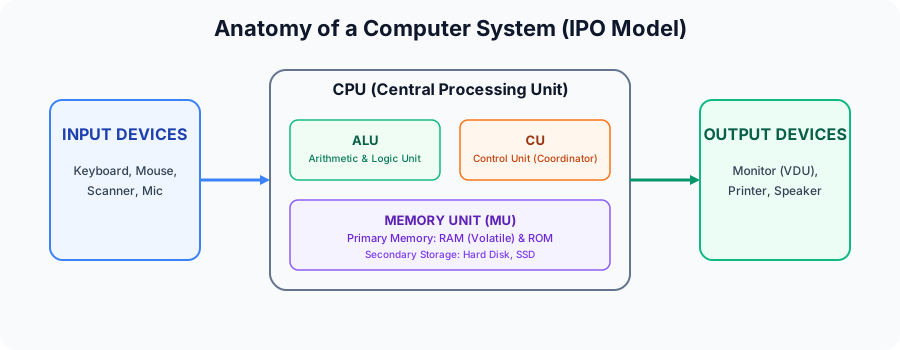
Topics Covered:
- Computer and Latest IT gadgets
- Evolution of Computers & its applications
- Basics of Hardware and Software
- Central Processing Unit (CPU) — ALU, CU, MU
- Input devices (Keyboard, Mouse, Scanner, Microphone, Touchscreen)
- Output devices (Monitor, Printer, Speaker, Projector)
- Computer Memory & storage (RAM, ROM, HDD, SSD, Pen Drive, CD/DVD)
- Application Software, Systems Software, Utility Software
- Open source and Proprietary Software
- Mobile Apps
🛠 Practical Exercises (6 hrs):
- Identify computer components (CPU, Monitor, Keyboard, Mouse, Printer)
- Connect peripherals via USB, HDMI ports
- Power on/off sequence practice
- Identify input/output devices in lab
- RAM vs ROM identification on motherboard
- Storage devices check (HDD, SSD, Pen Drive)
- Install and uninstall a mobile app
Important Full Forms:
| Term | Full Form |
|---|---|
| CPU | Central Processing Unit |
| ALU | Arithmetic Logic Unit |
| RAM | Random Access Memory |
| ROM | Read Only Memory |
| HDD | Hard Disk Drive |
| SSD | Solid State Drive |
| USB | Universal Serial Bus |
| HDMI | High-Definition Multimedia Interface |
Model Questions:
- Computer ka IPO model explain karo
- CPU ke teen main components likho
- Input aur output devices ke 5-5 examples
- RAM aur ROM me kya antar hai?